
Booking and sales
Opportunities, won and lost
How each lead's deal is tracked as an opportunity, which stages it moves through for your sales motion, and how to mark it won or lost with a reason
3 min readUpdated 27 September 2026
Every lead has an opportunity: the deal you are working towards. It records the stage, the value, the outcome and why it was won or lost. That outcome is what your reports and connected CRM use.
Stages
| Stage | Meaning |
|---|---|
| Open | Just arrived |
| Qualifying | Questions are being asked |
| Qualified | Met your qualification rules |
| Meeting booked | A meeting is scheduled |
| Proposal | A proposal or quote is out |
| Checkout sent | A checkout link was sent |
| Negotiation | Terms are being worked out |
| Closed | Won or lost |
Which stages apply depends on your sales motion in Settings → AI & selling → Sales behaviour. For example, an ecommerce motion goes Open, Qualified, Checkout sent, and has no meeting stage. A meeting-led B2B motion has no checkout stage.
Automatic moves
ClientTurn moves an opportunity forward by itself when a lead qualifies, a meeting is booked, or a checkout link is sent. Automatic moves only go forward. A late qualification never pulls a booked deal back.
Moving it yourself
On the lead page, the Actions panel has:
- Owner: who on your team is responsible. Unassigned leaves it in the shared queue.
- Deal stage: move an open opportunity to any stage your motion uses.
Members, admins and owners can change these.
Mark won or lost
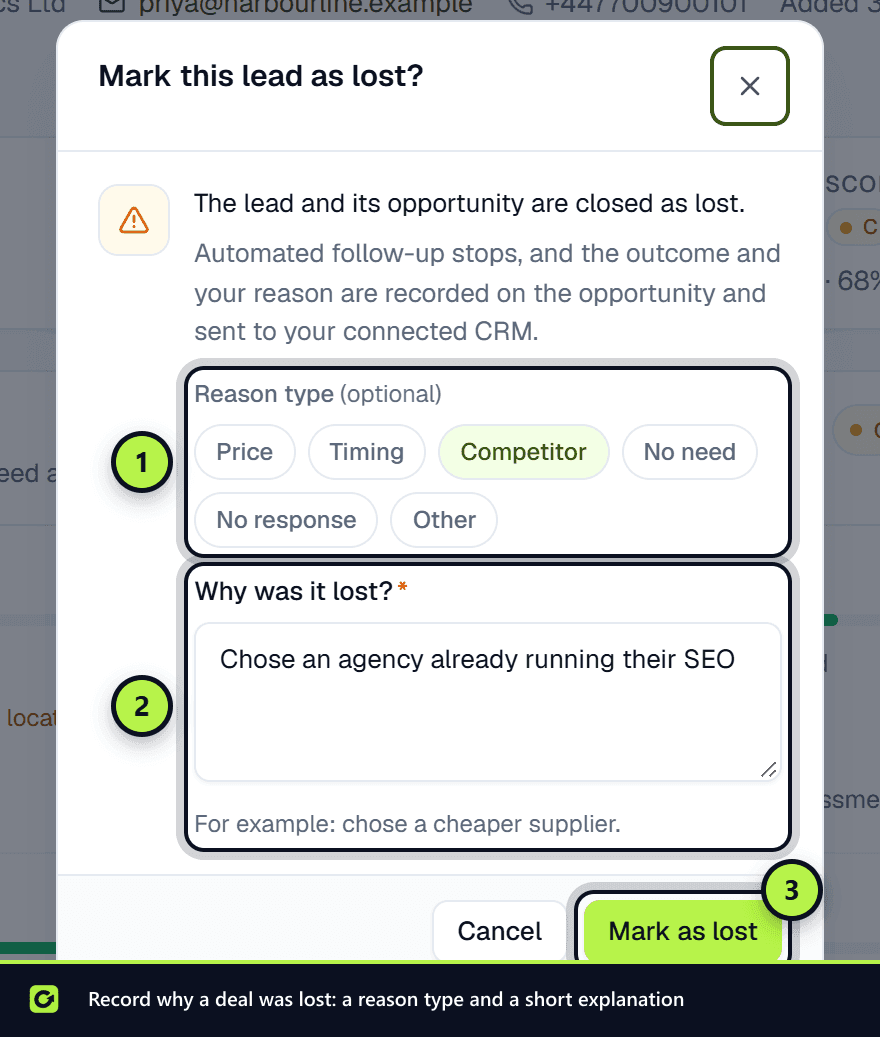
- Step 1: Open the lead and choose Actions → Mark won… or Mark lost….
- Step 2: Optionally pick a Reason type chip. For a win: Chose us — fit, Price, Timing or Other. For a loss: Price, Timing, Competitor, No need, No response or Other. If the reason box is empty, picking one fills in a starting sentence you can edit. The type is saved at the start of the reason, for example "[Price] chose a cheaper supplier", so reports and your CRM see it.
- Step 3: Under Why was it won? or Why was it lost?, write the reason. A reason is required.
- Step 4: Choose Mark as won or Mark as lost.
The lead and its opportunity are closed, automated follow-up stops, and the outcome and reason are recorded on the opportunity and sent to your connected CRM. Closed is only reached this way, never by an automatic move.
The reason shows on the lead page under Why this score.
A lead with more than one interest
A lead can want more than one of your services, for example a monthly subscription and a one-off website rebuild. Each is its own interest, shown as a card under Interests on the lead page: the service, its goal (a sign-up, a booked meeting ...), its stage, what the assistant will do next and its value. The line at the top sums up the lead across them.
- How an interest appears. The service the lead came in on, any other service they name in a message or choose on a form, or one you add with Add an interest on the lead page.
- Each closes on its own. The subscription can be sold by its checkout link while the website goes to a meeting. Winning one does not close the other: the lead stays open and follow-up carries on for the open interest. It stops when every interest is won or lost, or the lead opts out.
- Your pipeline and CRM. Each interest is its own opportunity, so your pipeline value counts it, and a connected HubSpot or Salesforce gets it as its own deal.
Related
Screenshots
Still stuck?
Customers can raise a ticket from the help button inside the app. Not a customer yet? Talk to us.