
Qualifying
How qualification works
How ClientTurn decides which question to ask next, never asks for what it already knows, stops once it knows enough, and reaches a Qualified, Not qualified or Needs review result by fixed rules
3 min readUpdated 27 September 2026
Qualification is how ClientTurn finds out whether a new lead is a fit, by asking your questions and checking the answers against your rules. Two separate things happen:
- Choosing the next question is adaptive. ClientTurn picks the most useful question it does not already know the answer to.
- Deciding the result is fixed. Your rules decide, the same way every time. AI never makes the decision.
The results
| Result | Meaning |
|---|---|
| Pending | Not enough answers yet |
| Qualified | Every rule is met. The lead moves on to booking |
| Not qualified | A rule marked Fail was not met |
| Needs review | A person needs to decide, for example because a reply could not be matched to an accepted answer |
Answers are checked in this order: are the required questions answered; is the service valid; is the area valid; has any Fail rule been broken; are required answers acceptable; does anything need a person to review it. Every result keeps its reasons, so you can see why a lead got it.
Known answers are never asked again
Before choosing a question, ClientTurn marks everything it already knows. A question counts as answered when:
- the lead has already answered it, or
- something already on the lead record answers it, such as the postcode or service from the lead form, or
- a fact recorded about the lead answers it with high confidence.
An answer taken from the lead record or a fact is labelled inferred. It only counts if it would have been accepted as a typed reply, so it can never produce an answer your question does not allow.
Choosing the next question
Of the questions left, ClientTurn asks the one worth most at this point in the conversation. It weighs how much the answer would tell you, how much it matters to the decision and to the deal, against how awkward it is to ask. Some questions are held back until the time is right. Budget, for example, is not asked before the lead has said what they need.
One question per message
Each message asks one question. If an assistant draft asks more than one, it is rejected and rewritten before anything is sent.
Stopping once enough is known
For your sales motion, there is a point where enough is known to take the next step, such as offering a booking. Once it is reached, optional questions are dropped. Required questions are never dropped: a lead cannot be qualified, and booking cannot open, while one is unanswered.
Qualification depth, in Settings → AI & selling → Sales behaviour, moves that stopping point:
| Depth | What is asked |
|---|---|
| Light | Only the questions that unlock the next step, then required ones only |
| Standard (default) | The most useful questions, stopping once enough is known |
| Thorough | Every configured question that applies |
If no sales motion is set, every depth behaves like Standard.
Where AI fits in
AI is an optional assistant, and off unless you turn it on. It may only work out what a reply means, or pick out a likely answer to one of your questions. Your rules still make the decision. If the AI is unsure, or the value does not match an accepted answer, the lead goes to Needs review and a person decides. AI never makes a promise, a quote, availability or a service area.
Seeing it on a lead
Open the lead and choose the Qualification tab. From top to bottom it shows:
- Buying intent: how ready the lead is to act, and the evidence behind it. See Buying intent explained.
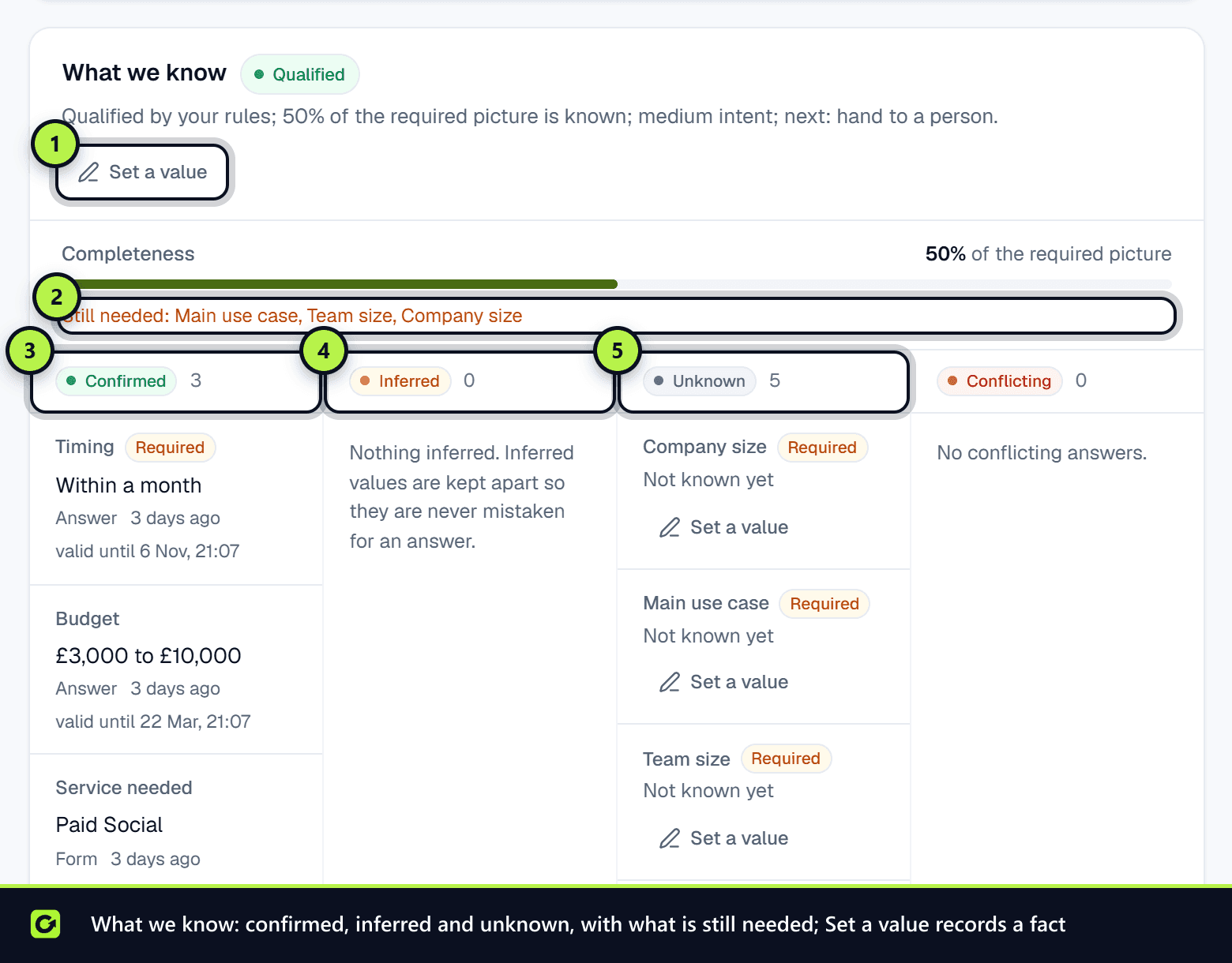
- What we know: each qualification detail as Confirmed, Inferred, Unknown or Conflicting, how complete the picture is, and your rules' result. See Correcting what is known about a lead.
- Your qualification questions: your own questions as Answered, Inferred or Unanswered. These answers are the ones your rules decide on.
- Qualification history: every re-run, correction and override, with who made it.
The Next best action card beside the record says what happens next and why. See The next best action.
If there is no question left to ask and the lead is not yet decided, the conversation is handed to your team.
Related
- Setting up qualification questions
- Lead scoring explained
- Your qualification policy
- Sales motions and close targets
Screenshots
Still stuck?
Customers can raise a ticket from the help button inside the app. Not a customer yet? Talk to us.