
Qualifying
The next best action
What the Next best action card on a lead tells you, why a question was chosen or skipped, what else was considered, and how to override it or run it again
4 min readUpdated 27 September 2026
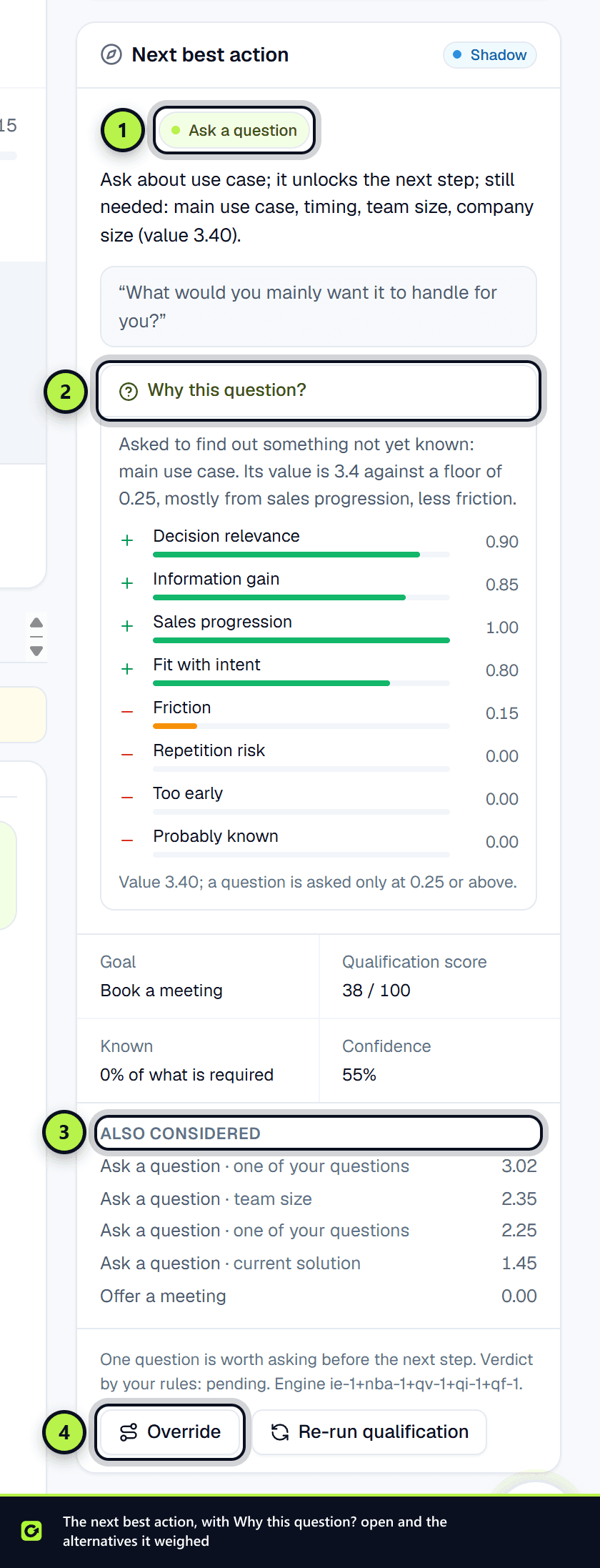
For every assessed lead, ClientTurn works out one next step: ask one question, answer theirs, offer a meeting, hand over to a person, wait, and so on. It is decided by fixed rules before any message is written, and shown on the Next best action card on the right of the lead page.
The actions
| Group | What it means |
|---|---|
| Ask | Ask the one question worth most right now |
| Answer | Answer what the lead asked first; sometimes followed by one question |
| Follow up | Share something useful with a soft next step |
| Book | Offer a meeting. Nothing more is asked first unless it could rule the lead out |
| Checkout | Send the approved checkout or sign-up link |
| Escalate | A person on your team should take the lead now. A last resort: the lead asked for a person, a complaint, a legal or contract question, or a rule you set. A lead under review, a security question or a ready buyer the assistant cannot send a link to is not escalated: the assistant carries on and asks your team for help in the background |
| Nurture | Keep in touch, remembering what is already known |
| Disqualify | The lead does not fit on a confirmed answer; stop pursuing it |
| Wait | Send nothing until the lead's stated time, or at all if they said no |
A lead that has said it is not interested is never asked a question or offered a meeting.
Why this question?
When the action is to ask, the card shows the question and Why this question?. It lists what raised the question's value (how much the answer bears on the decision, how much would be learned, whether it moves the sale on, how well it fits the lead's intent) and what lowered it (effort for the lead, repeating an earlier question, asking too early, probably already known). A question is only asked when its value reaches the floor shown.
When nothing is asked, the reason says why, for example because the lead is ready to book and a question would only slow them down.
Also considered lists the other actions and questions that were weighed, with their values.
What else the card shows
- Goal: what this lead is being moved toward, such as booking a meeting or a direct sale.
- Qualification score and Known: the lead score, and how much of the required picture is known.
- Confidence, the rule that produced the action, your rules' current result, and the engine version.
If the action is to offer a meeting and no calendar or booking page is connected, the card says so and links to Settings → Connections.
Overriding it
- Step 1: Choose Override on the card.
- Step 2: Choose the action, say why and, for Wait, when to resume. For Hand to a person, choose why a person is needed.
- Step 3: Choose Save override.
The override holds until the lead does something new, which triggers a fresh assessment. What the engine had chosen is kept under Also considered, and the override appears in the lead's Qualification history. Asking a specific question cannot be chosen by hand: the engine plans questions.
Re-run qualification assesses the lead again now, from everything currently known.
Shadow and live
Owners and admins see the engine's mode on the card and in Settings → AI & selling → Qualification policy:
| Mode | What happens |
|---|---|
| Off | No assessment is made |
| Shadow | Assessments are made and shown, and compared with the assistant's existing question order, but the assistant does not act on them yet |
| Live | The next best action is what the assistant acts on |
Who can do what
Members, admins and owners can re-run and override. Viewers can see the card but not change it. Copilot can explain the next action and re-run qualification, but only a person in the app, or a connected assistant a person supervises, can override it.
More than one interest
When a lead wants more than one of your services, the assistant plans each one and makes one move per message: the interest closest to being closed goes first. Facts about the business (its size, who decides, timing) are asked once and used for every interest; questions about one service (its budget, its scope) are asked for that service only. A checkout link can carry one short line about the other interest, such as asking whether a quick call about it would help, and never a second question. Each interest's next step shows on its card under Interests on the lead page. See Opportunities, won and lost.
Related
Screenshots
Still stuck?
Customers can raise a ticket from the help button inside the app. Not a customer yet? Talk to us.