
Billing
Your free trial
How the 14-day trial works, why a card and the terms are needed to start it, the trial's limits, and what happens when it ends
5 min readUpdated 30 September 2026
Every new workspace starts with a 14-day free trial. You choose a plan and add a card to begin. Nothing is charged on the day you start.
Starting the trial
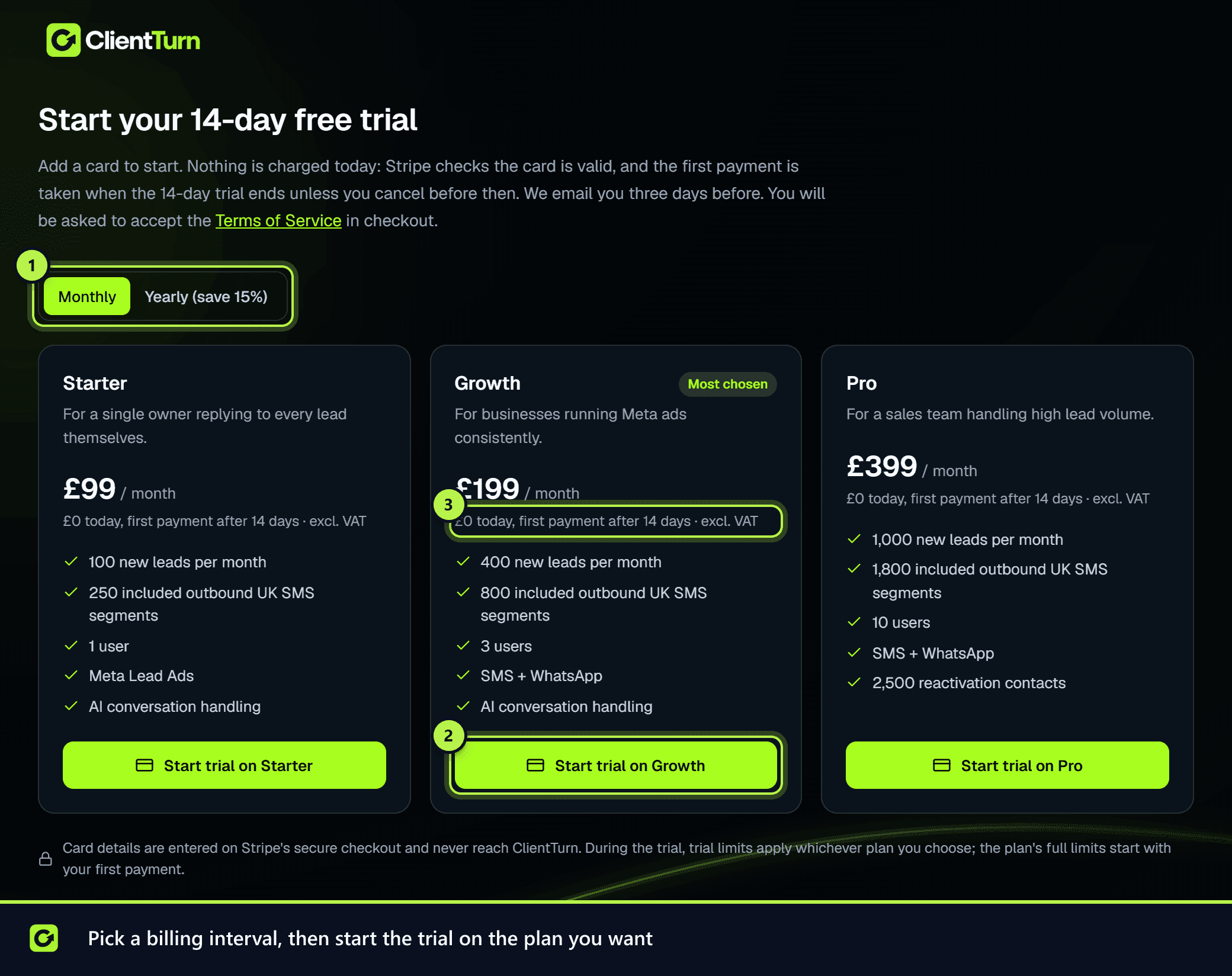
Until a trial has started, ClientTurn sends you to the Start your 14-day free trial page instead of the app.
- Step 1: Pick Monthly or Yearly (save 15%).
- Step 2: Choose Start trial on Starter, Growth or Pro. Enterprise is arranged with our sales team, so it has no trial button.
- Step 3: In the Stripe checkout, enter a card. Stripe checks that the card is valid. It does not take a payment.
- Step 4: Tick the box to accept the ClientTurn Terms of Service. Checkout will not complete without it.
- Step 5: You come back to ClientTurn and the trial starts.
Only the workspace owner can start the trial. Anyone else who signs in sees a message asking them to ask the owner.
What the trial includes
Whichever plan you choose, the trial runs on these limits until the first payment succeeds. The trial is for trying the product. It is not a free month of a paid plan's messaging.
| During the trial | |
|---|---|
| Length | 14 days |
| New leads | 25 |
| Users | 1 |
| UK SMS segments | 8 |
| Follow-up email from your own mailbox | Not capped by the trial |
| Not included | |
| AI credits | 50 (about 18 assistant replies) |
| Reactivation | Not included |
| SMS top-up packs | Not available. Upgrade to get more SMS |
Email from your own connected mailbox is the main follow-up channel during the trial. By default the first message to a new lead goes by SMS when they gave a mobile number, and later reminders go by email. Half of the trial's 8 SMS segments are kept for the AI assistant's replies to leads who text back, so you see an instant text arrive and a conversation carry on. Once those are used, first messages go by email, and the assistant keeps answering leads who reply by email. See Channel & SMS budget.
Find Leads (sourcing) and cold outreach email are not included during the trial. They switch on with your first payment.
SMS top-up packs can't be bought during a trial. The Message credits card in Billing shows a note instead of Buy buttons. Nothing is billed during a trial. On a paid plan, once an allowance is used up, prepaid top-up credit is the only way to send more until the allowance resets. If you need more SMS during the trial, upgrade early (below).
You can see your use against each limit in Settings → Billing & Usage. See Usage and limits.
Before the trial ends
- Three days before the end, the workspace owner and admins get a notification, sent in the app and by email. It gives the date and the amount that will be charged.
- For the last three days, a banner in the app says how many days are left, with Upgrade now: start your plan today and Review plan buttons.
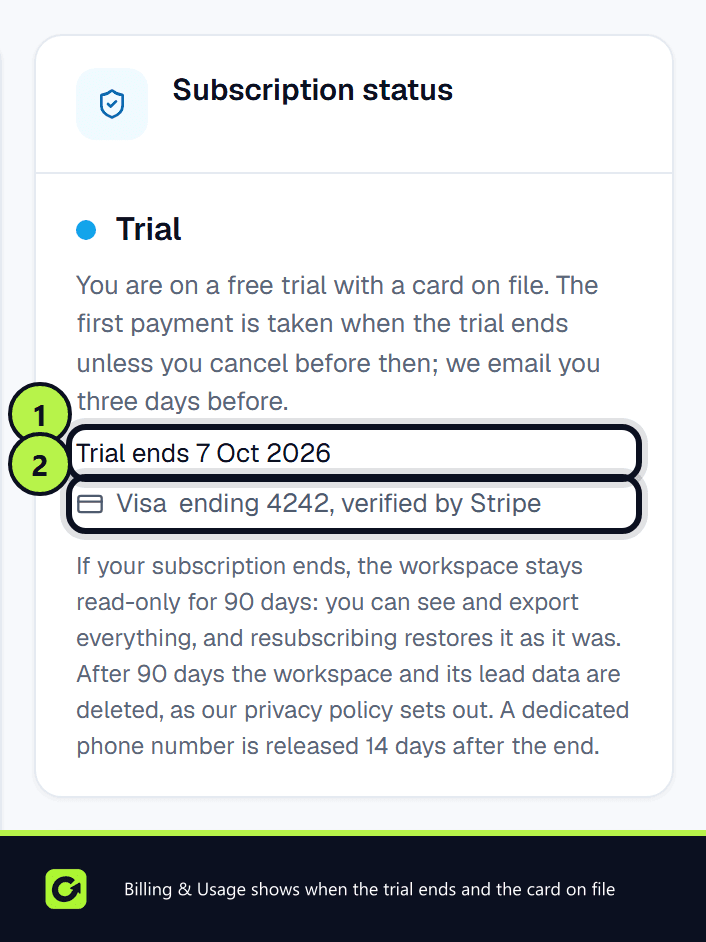
- Settings → Billing & Usage shows Trial ends with the date, and the card on file.
To change plan or cancel before the first charge, open Settings → Billing & Usage and choose Manage billing (Stripe). See Changing your plan.
Upgrading early
You don't have to wait for the trial to end. Upgrade now ends the trial today and charges the card you added at the start. There is no second checkout.
- Step 1: Choose Upgrade now: start your plan today. You'll find it in Settings → Billing & Usage, in the trial banner, or in the prompt described below.
- Step 2: The plan you chose when you started the trial is selected. You can switch to Starter, Growth or Pro here. For Enterprise, choose Talk to sales.
- Step 3: Choose Upgrade now. The next step shows exactly how much your card will be charged today.
- Step 4: Choose Confirm and pay. Your plan starts straight away with its full limits, and it renews on the same date each month (or year).
Only the workspace owner can upgrade. Admins see the prompt, with a note to ask the owner.
When your trial SMS runs out mid-conversation. A lead might text back after the trial's SMS allowance is used up. If you've connected a mailbox and have the lead's email address, the assistant replies by email instead. Otherwise the reply is held and the lead is flagged for you. The dashboard, the Inbox and the lead's page then show "To continue this conversation fully by SMS, upgrade your subscription now." If you choose Not now, the pop-up stays hidden for that lead for 24 hours, but the banner on those pages stays. When you upgrade, held replies are sent by SMS through the usual checks, such as quiet hours and opt-outs. Replies more than three days old, and leads someone has already answered, stay with you.
If the payment doesn't go through:
- Card declined: nothing is charged and your trial carries on. Update your card in the billing portal and try again.
- Your bank asks you to confirm: choose Confirm the payment with your bank. Your plan starts once the payment is confirmed. Until then, the trial carries on.
Pressing the button twice never charges you twice.
When the trial ends
- The payment succeeds: you move to the plan you chose, and its full allowances switch on.
- The payment fails: nothing stops straight away. You get three days of full access while the charge is retried daily. See What happens if a payment fails.
- You cancelled: the workspace becomes read-only for 90 days. Your data stays and can be exported; after 90 days it is deleted, as our privacy policy sets out.
One trial per business
Each workspace gets one trial. If a subscription ends and you come back, the Resubscribe to carry on page charges from the first day, and your setup and data are still there.
Related
Screenshots
Still stuck?
Customers can raise a ticket from the help button inside the app. Not a customer yet? Talk to us.