
Compliance
Consent and WhatsApp opt-in
Which relationships allow you to message someone, why consent needs evidence, which channels can be used cold, and why a phone number is not a WhatsApp opt-in
4 min readUpdated 27 September 2026
Before every message, ClientTurn checks what you are allowed to send to that person, on that channel, at that moment. The check uses facts on record: how you came to have their details, any consent and its evidence, who they are, and the channel. It is a fixed set of rules. AI never makes this decision and cannot override it.
The relationship is recorded with the lead
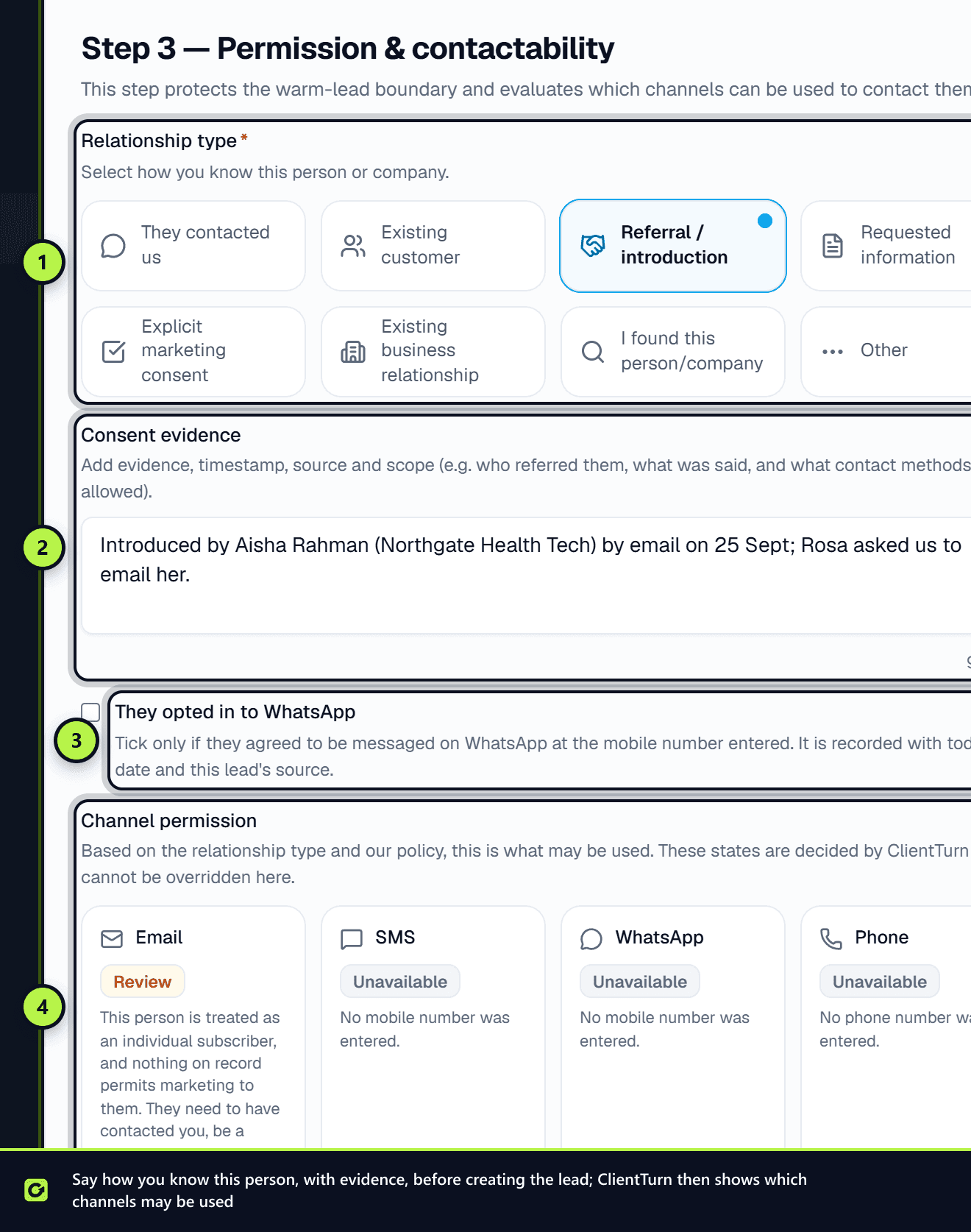
Each lead carries a record of how you came to have their details. Leads from a lead form, an enquiry or a message they sent are recorded as they contacted us. When you add a lead by hand, the Add lead wizard asks you to choose one of:
- They contacted us
- Existing customer
- Referral / introduction
- Requested information
- Explicit marketing consent
- Existing business relationship
- I found this person/company
- Other
Some choices, such as a referral or explicit consent, ask for evidence: who referred them and when, or how and when they agreed. Record it while you still remember it.
What each relationship allows
For people treated as individuals, which includes sole traders and ordinary partnerships:
| Relationship | Marketing messages allowed? |
|---|---|
| They contacted you, or asked for information | Yes, within the scope of what they asked about |
| Existing customer or business relationship | Yes |
| Explicit marketing consent, with evidence | Yes |
| Accepted your connection or follows you | One non-promotional opener only. See LinkedIn and social messages |
| Referral, import, found by you, or unknown | No. They need to give consent first |
Companies, LLPs and Scottish partnerships are treated differently. See Corporate and individual subscribers.
If someone has withdrawn consent, nothing is sent to them, in the same way as an opt-out.
Transactional messages, such as a booking confirmation or reminder, are not marketing and are not limited by these rules. Suppression still applies to them.
Which channels can be used cold
Cold outreach is email only, to business addresses. SMS, WhatsApp and social messages cannot be used to contact someone cold, and no setting changes that.
SMS and WhatsApp are for people who gave you their mobile number themselves, for example on a lead form. ClientTurn never buys or looks up phone numbers.
WhatsApp opt-in
WhatsApp has its own rule on top of the law. Meta requires an explicit opt-in that names your business before you start a WhatsApp conversation with someone. A phone number on a lead form is not one, unless the form clearly asked for WhatsApp.
| Situation | What ClientTurn does |
|---|---|
| The person messaged you on WhatsApp in the last 24 hours | Replies are allowed. They started the conversation |
| More than 24 hours since they last messaged, and a WhatsApp opt-in is on record | Only an approved WhatsApp template can be sent |
| No WhatsApp opt-in on record, and they have not messaged you in the last 24 hours | Nothing is sent on WhatsApp, and the message is held for a person to decide |
Recording a WhatsApp opt-in
A WhatsApp opt-in is recorded:
- On the lead page. Under the contactability strip, a lead with no opt-in shows No WhatsApp opt-in on record and a Record WhatsApp opt-in button. Enter the Date they opted in, How they opted in (Ticked a box on a form, Asked us on WhatsApp, Agreed on a phone call, Agreed in person, Agreed by email, or Other) and any Detail (required for Other), then choose Record opt-in. It is kept in the audit trail with the date and how they agreed.
- In the Add lead wizard. On the Permission & contactability step, tick They opted in to WhatsApp. It is recorded with today's date and the lead's source.
- Through the ClientTurn API or a connected AI assistant, with the WhatsApp consent flag set.
Only record one if the person agreed to be messaged on WhatsApp at that mobile number. CSV imports and lead-form connections do not record a WhatsApp opt-in. Leads from those sources can still be messaged on WhatsApp once they message you first.
WhatsApp templates outside the 24-hour window
WhatsApp only allows free-form messages within 24 hours of the person's last message. After that, only a template approved by Meta can be sent. See WhatsApp templates for reactivation.
Where the rules are recorded
Settings → Data Controls → Basis for contacting people is where you state what makes your outreach lawful, for example consent or legitimate interests, with a note summarising your assessment. ClientTurn records what you state. It does not assess it for you.
Every send records the decision that allowed it and the rules in force at the time. Settings → Data Controls → Evidence you can produce shows a 30-day summary.
Related
Screenshots
Still stuck?
Customers can raise a ticket from the help button inside the app. Not a customer yet? Talk to us.