
Finding leads
Getting leads from LinkedIn Lead Gen Forms
Bring submissions from your LinkedIn Lead Gen Form ads into ClientTurn as inbound leads
2 min readUpdated 26 September 2026
LinkedIn Lead Gen Forms are the forms that open inside a LinkedIn ad. The person submits their own details, usually including their work email, so a submission is an inbound enquiry: it becomes a lead, not a prospect.
Before you start
- You need to be an owner or admin in ClientTurn.
- On LinkedIn, you need an admin role on the Company Page that owns the ad account and its lead forms.
Connect LinkedIn
- Step 1: Open Settings → Connections and find LinkedIn Lead Gen Forms under Ads / lead sources.
- Step 2: Choose Connect, then Connect again in the panel.
- Step 3: Sign in to LinkedIn and approve access.
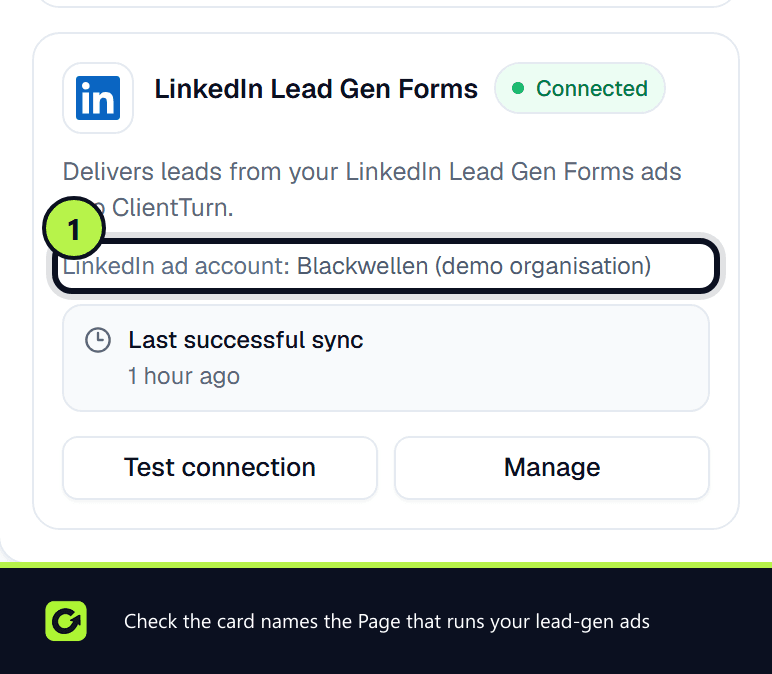
- Step 4: Back in Connections, the card shows the organisation it linked to.
ClientTurn links to the first organisation your LinkedIn account administers. If you administer several Pages, check the name on the card is the one that runs your lead-gen ads.
For more detail, see Connecting LinkedIn.
How leads arrive
ClientTurn checks your organisation's lead forms for new submissions every few minutes. The first check looks back over the previous 24 hours. Each check reads every page of results LinkedIn returns, so a busy form does not lose leads. Submissions made from a form's own Test preview are skipped, so previewing your form does not create a lead. New leads are recorded with LinkedIn Lead Gen Forms as their source. Each submission goes through the same intake checks as every source (see Lead sources explained), and a new lead is qualified and enters your follow-up sequence.
If nothing arrives
LinkedIn gives lead-form access only to applications it has approved for its Lead Sync programme, and only for members with the right role on the Page. If either is missing, the connection completes but every check is refused, and the card changes to Reconnect required with LinkedIn's reason.
- Confirm your LinkedIn account has an admin role on the Company Page.
- Choose Test connection on the card.
- If the message mentions lead access permission, contact support.
Related
Screenshots
Still stuck?
Customers can raise a ticket from the help button inside the app. Not a customer yet? Talk to us.